Awards
Most of what a pack hands out at the end of a derby has nothing to do with the timer. Best Paint, Most Original, Judges' Choice — somebody looks at the cars and decides. Trusty Track can hold those alongside the speed trophies, so the whole list is in one place when it is time to announce them.
Race → Awards.
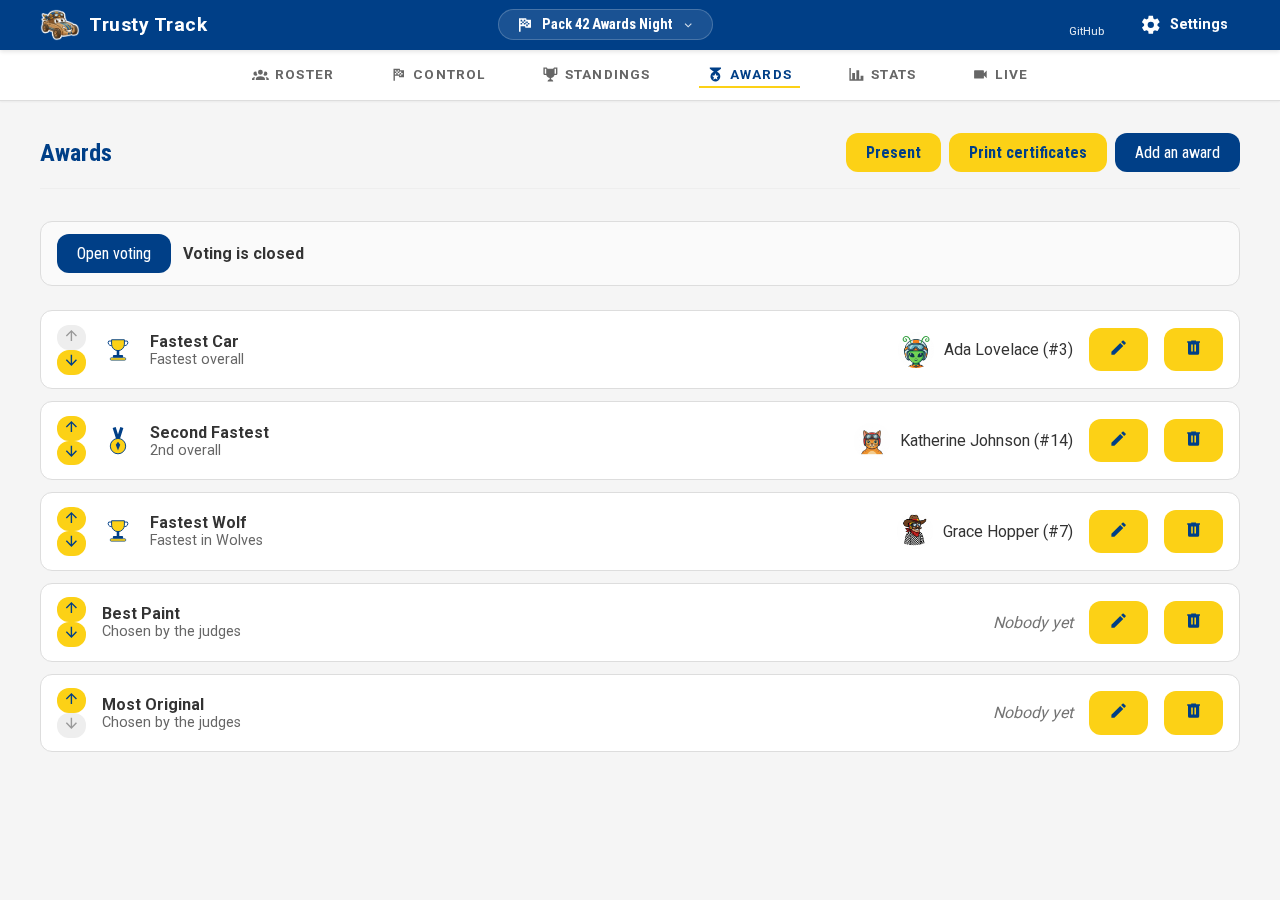
The championship trophies are already here
The moment your race has a final — built by the Round Wizard, or added afterward through Add Round — this page already has 1st, 2nd, 3rd (and however many more Championship Trophies on the race settings asks for) pointed at it, with nobody decided yet until the racing says so. If your pack races by den as well, each den gets its own set — and if the final draws from each den at once (a district or council derby's grand final, say), ticking Also give one overall trophy on the Round Wizard's Championships step adds one more set for whoever is fastest across the whole final, on top of the per-den ones. Nothing to type in by hand for the trophies every derby gives out; add Best Paint or any other award of your own the ordinary way, below.
Deleted them by mistake, or skipped the wizard entirely? The empty state here offers an Add the N championship trophies button that brings the same set back once a final exists — see The Championship Trophies number for the exact rule.
The two kinds
Every award is one name and one winner. What differs is where the winner comes from.
| Winner | Use it for | |
|---|---|---|
| Speed-based | worked out from the standings | Fastest Car, Fastest Wolf, Slowest Car, second and third place |
| Somebody we choose | you pick a racer | Best Paint, Most Original, Judges' Choice |
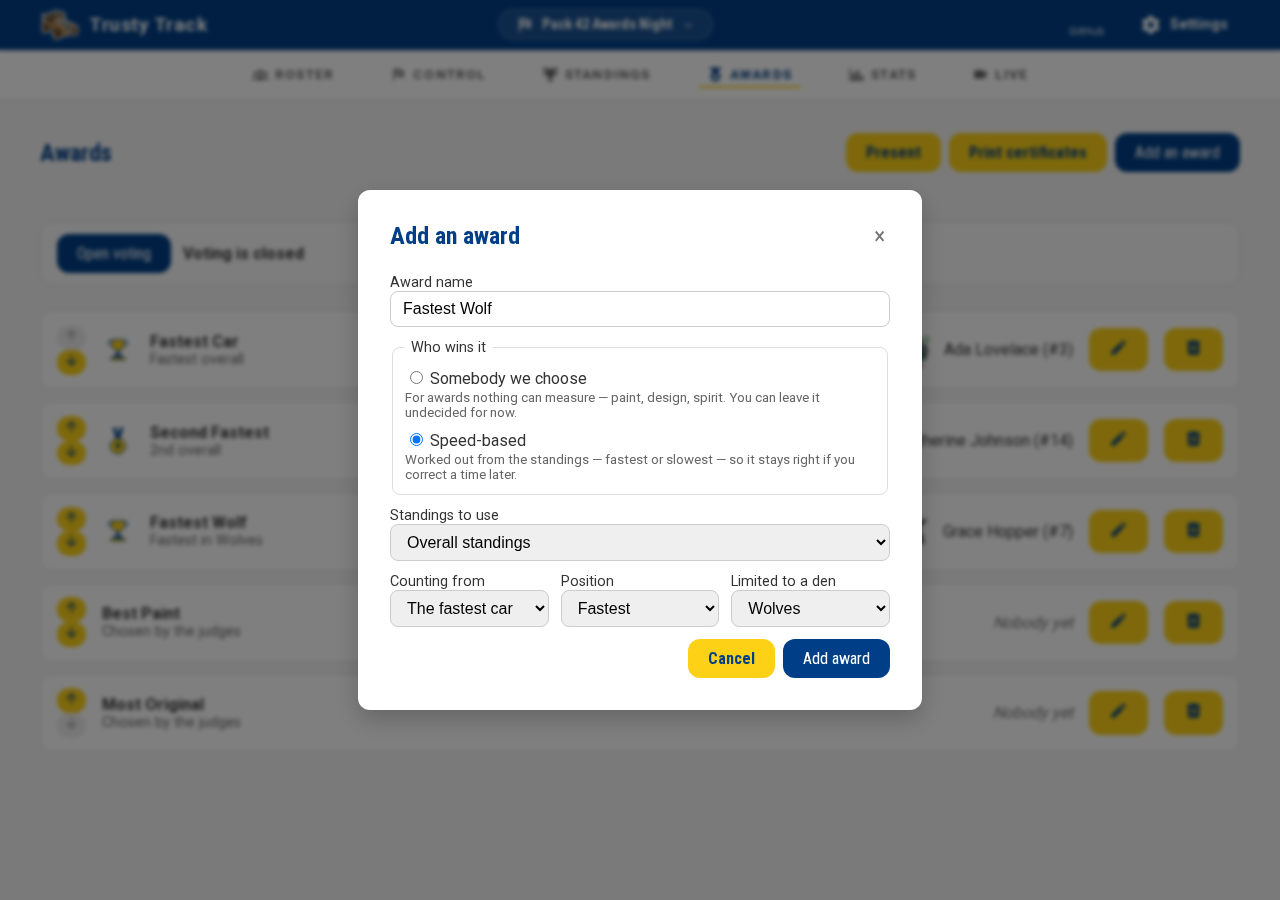
Add an award opens on Speed-based, since it is already correct with no further input — it defaults to the last championship round, or the qualifying standings if the race has none yet. If you type a name that sounds like a speed award ("Fastest", "Champion", "Slowest", "2nd") while Somebody we choose is picked, the form offers a one-click switch to Speed-based rather than letting it save as a judged award that can never resolve.
Speed-based
You describe the award rather than naming a winner: which standings, which end, which position, and optionally which den.
- Standings to use — Overall (qualifying rounds), or one round's. These are not the same thing: overall standings cover the qualifying rounds only — a championship round's field is picked from those standings, so a final's times never feed back into them (see Scoring). A new speed award defaults to the last championship round when the race has one, since a "Pack Champion" trophy almost always means the winner of the final — pick Overall (qualifying rounds) instead if you want the fastest qualifier rather than the finalist.
- Counting from — The fastest car or The slowest car. Most awards count from the fastest; see The slowest car below.
- Position — Fastest, 2nd, 3rd, and so on. Counting from the slowest, these read Slowest, 2nd slowest, 3rd slowest.
- Limited to a den — for "Fastest Wolf". Leave it on The whole pack otherwise.
Tip
"Fastest in each den" is one award per den, not one award. Add them individually and name each after its den — that is also how they get announced.
Because the award describes a position rather than a person, correcting a time moves the trophy. Set them up before the racing starts; if you find a mistyped time at the end of the day and fix it, the awards follow.
The slowest car
Plenty of packs give a trophy to the slowest car, and it is the same standings read from the other end. Set Counting from to The slowest car and leave Position on Slowest.
It works with everything else on the form: limit it to a den for "Slowest Wolf", or point it at one round for the slowest car in the final.
Note
A car that has not raced yet can never win it. Racers with no result sit at the bottom of the standings, so without this the trophy would go to whoever registered and stayed home. Only cars that actually ran are considered.
Somebody we choose
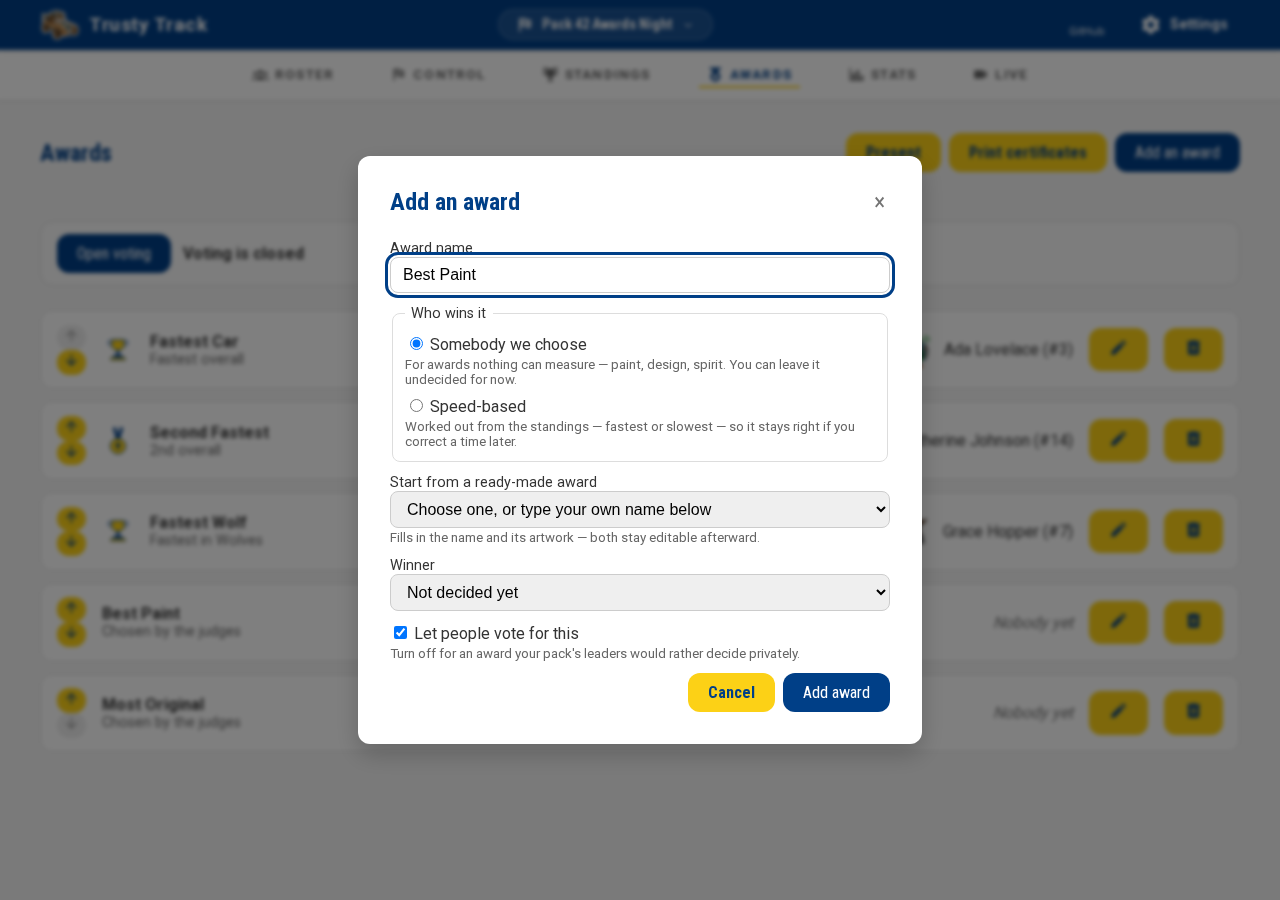
Just a name and, when you have decided, a racer. Leave the winner as Not decided yet until the judging is done — most of these stay empty until the very end of an event, which is normal and nothing is wrong.
Starting from a ready-made award
Start from a ready-made award offers the usual superlatives — Best Paint, Most Original, Best Use of Color, Most Aerodynamic, Most Patriotic, Best Scout Spirit, Judges' Choice — so a pack that has never run one of these does not have to invent a name the night before. Choosing one fills in the name and its artwork; both stay ordinary editable fields afterward, so you can rename it or type something else entirely without losing the picture. A short line under the picker explains what each one is for — useful for a name like "Best Scout Spirit" that a first-time operator might otherwise have to guess at.
It has no effect on a speed-based award. Those get their artwork worked out automatically from what they are — first place, second and third, or the slowest car — with nothing to choose.
Letting people vote
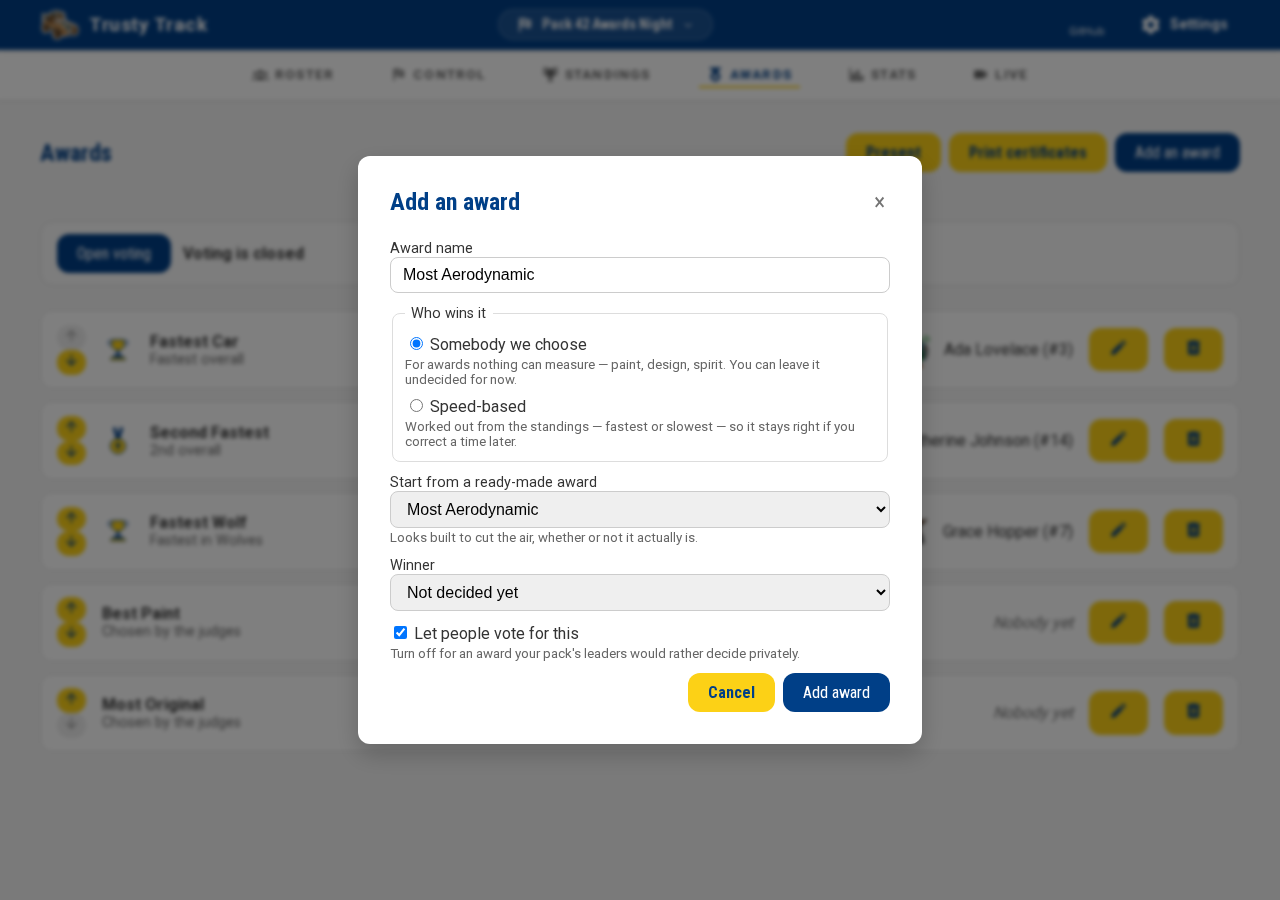
For a judged award, you can let people vote from their own phones instead of walking the cars around with a clipboard.
- On the award, turn on Let people vote for this. It is on by default for a new judged award — turn it off for one your pack's leaders would rather decide privately.
- When you are ready, click Open voting (near the top of this page) — grayed out until at least one award has Let people vote for this on, so voting cannot open on an empty ballot. The button's label flips to Close voting, and the text beside it says "Voting is open." Share the address that appears next to it — a phone on the venue wifi that opens it sees every car's number, name and photo, and can vote for any award you have left on. Trusty Track works out an address a phone can actually reach — not the one your own browser shows, if that one would only work on this machine — and offers a Copy button and a QR code beside it for handing to someone across the room. If it says it could not find a working address, see finding this machine's address and check the phone can reach it before relying on it. Project QR code opens the same code full-screen on a fresh display window, for a gym-wall screen or an auxiliary TV instead of walking a phone around — see Audience display views.
- Click Close voting before the ceremony. Nothing does this for you — it is your call, the same way starting the ceremony itself is.
If some cars have no photo, this page tells you before you open voting. A car with no photo shows its number in large type on its den's color instead of a photo, so a voter still has something to tap — fine for a speed award, not as good as a photo for one about how the car looks. A line above the voting button counts how many cars are missing a photo and links to the roster, where Upload Photos (in the ⋯ menu) adds several at once.
Only the first award is open on the ballot; the rest are collapsed behind their own heading. Tapping a heading opens that award and shows its cars; a voter who has already voted for one sees so on its heading without having to open it — "You voted for #12", say.
Nobody's name or photo appears on the voting page. Voting is about the cars, and only the cars: a car's number, its name if it has one, and its photo. Whoever is voting never sees who built it.
One shared phone or tablet can be used all day. Nothing stops someone voting more than once from the same device — the assumption is a single iPad by the cars, passed from hand to hand, not a ballot tied to a person. What your pack decides that is worth is your call, not the app's.
A tap casts the vote right away, with no "are you sure?" step — the confirmation names the car ("Thanks for voting for #7 Blue Streak!") so an accidental tap while scrolling is at least visible to whoever is holding the phone, rather than a silent vote for the wrong car.
A vote never fills in the winner by itself. As soon as an award has any votes, its tally — how many votes each car got — appears right on its row in the award list, with a Use this result button next to each car that fills in the winner exactly as if you had picked it from the list. Both show up while voting is still open, so you can watch the count as it comes in; you do not need to close voting first. A tie, a car that shouldn't count, or a lopsided result stays yours to look at and decide on before anything is announced.
The running order
Awards are listed in the order you will announce them, and the arrows on the left move one up or down. Most packs put the speed awards last, because that is the one everyone is waiting for.
At most one trophy per racer
Many packs run by the rule that a scout who wins the pack championship should not also take home their den's trophy — the den trophy should roll down to the next-fastest scout in it, so more children leave holding something. Turn on At most one trophy per racer, in race settings, and Trusty Track does this for you: a car that already holds one award is skipped when a later award is worked out. Off by default — nothing changes until you turn it on.
Which trophy a fast racer keeps depends on the running order above. Whole-pack awards are decided before den awards, so the overall champion's den trophy is what rolls, never the other way round. Among awards of the same reach — two den trophies, say — the one you have placed later in the list is decided first, on the theory that a ceremony builds to its biggest trophy and the last one announced is the one nobody hands back. Put your pack-wide trophies at the bottom of the list and the den trophies above them, and the ordinary run of a ceremony already does the right thing.
The list says so when a trophy has rolled down — "Rolled down from Fastest — Jordan Mitchell (#7) already won Fastest Car." — so you are never looking at an unexplained winner.
A judged award like Best Paint is never part of the roll-down, in either direction. Choosing Best Paint is a person's decision, and a computed rule never overrides it — turning this setting on will never move a judged award's winner, and a judged award never bumps a speed trophy out from under its own winner either. If the racer you pick for a judged award already holds another trophy, the list just says so — "Also holds 'Fastest Car.'" — and the same warning appears right on the picker while you are choosing, whether or not this setting is on. It is a nudge, not a refusal: award it anyway if that is what your pack wants.
Reading the list
Each award shows what it is for and who currently holds it.
Not decided by the racing yet against a speed award means the standings have not gone that far — an award for third place has no winner until three cars have run. This is expected during an event.
If an award says "Not set up — this award cannot be won", its rule is missing. Edit it and choose which standings it reads and which place wins it.
Announcing them
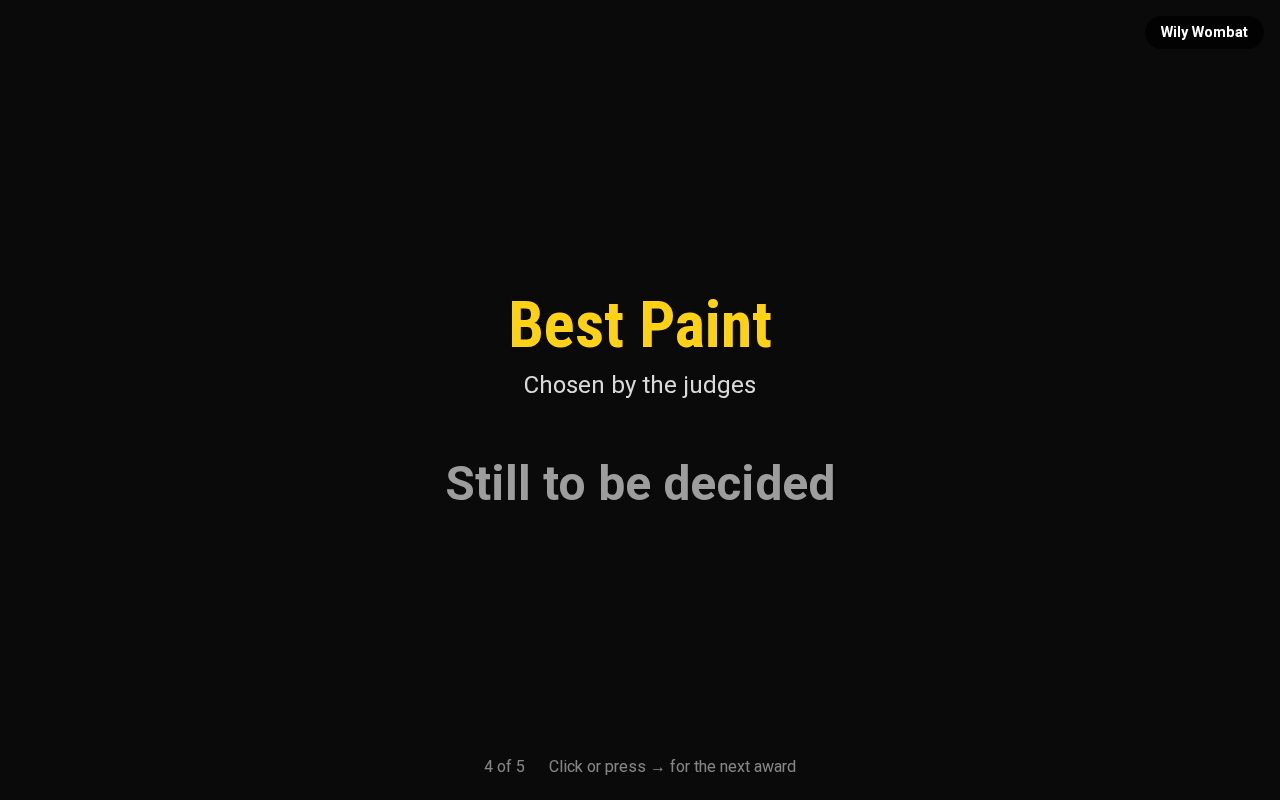
Present opens the ceremony in a new tab, the same way Launch Projector Mode does — leaving your own tab on the Awards page. One award fills the screen at a time, with the winner's photo and — for a ready-made superlative or a speed award — its artwork. Click or press the right arrow for the next one — a presenter remote works too, since it sends the same keys.

It is an ordinary address (/race/1/awards/present), so you can also open it
directly on the machine driving the projector.
Leaving the ceremony
The ceremony fills the whole screen with no navigation bar, which is the point — nothing should distract from the trophy on the projector. To leave it: press Escape, or move the mouse and click ← Back to awards in the top-left corner. The link fades out after a few seconds so it stays out of the photograph, and reappears the moment you move the pointer again or tab to it with the keyboard.
Driving it from where you are
If the ceremony is on a screen across the room, you do not have to walk to it. Put it there from Displays — choose Awards ceremony for that screen — and the row grows ‹ and › buttons that move it on.
Note
Awards ceremony is only in that list once the race has at least one award. Set them up here first.
 The screen's row on the Displays panel. ‹ and › move the ceremony
on that screen from wherever you are.
The screen's row on the Displays panel. ‹ and › move the ceremony
on that screen from wherever you are.
Both work at once: somebody at the screen can still use the arrow keys or a presenter remote, and the buttons move whichever award is actually up. Hand the remote to whoever is speaking and keep the buttons as a backup, or run the whole ceremony from your laptop.
It does not move on by itself. The other audience screens rotate on a timer because nobody is driving them; this one waits for you, so it will not announce the next trophy over the applause for the last one. It also stops on the last award rather than starting again, which is the one people photograph.
Awards nobody has won yet still appear, marked Still to be decided — most of them are, right up until the moment you announce them.
Printing certificates
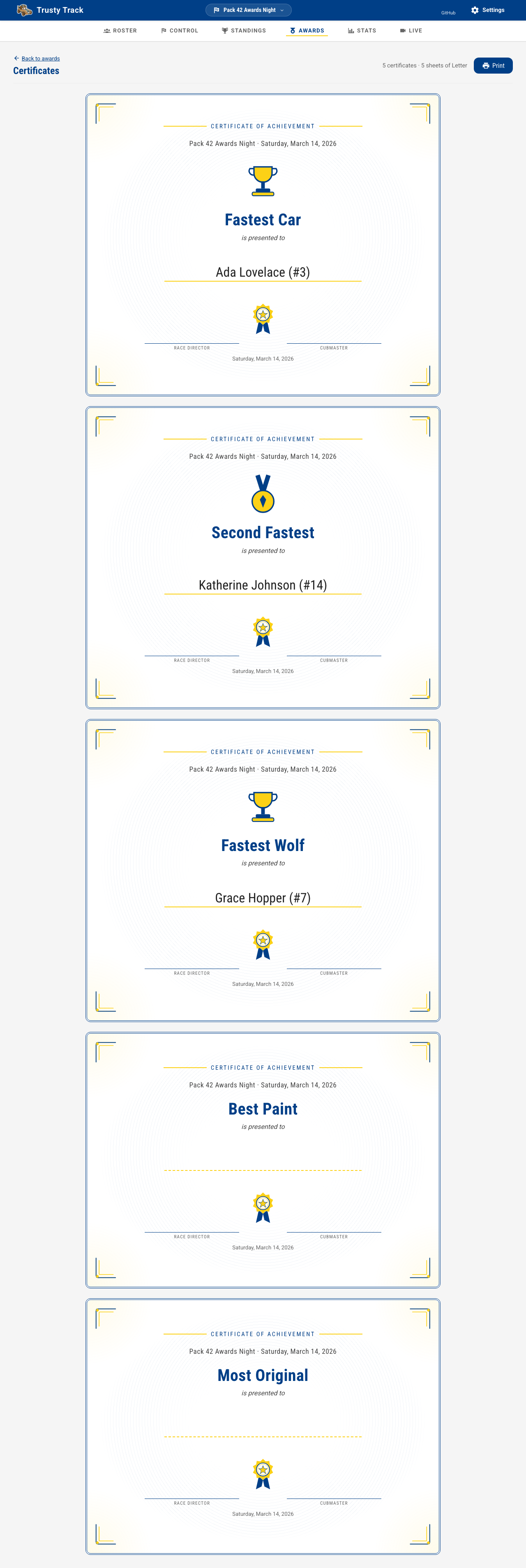
Print certificates, next to Present, opens one certificate per award — the ceremony's own running order, so the stack comes off the printer in the order you will hand them out. An award still undecided prints too, with a blank line to write a name on, rather than being left out of the batch; a ready-made superlative or a speed award prints its artwork, and anything else prints plain. More in Printed documents.
Certificates are also one of the cards on the print hub — useful if you are printing pit passes, the results sheet and certificates together in one sitting rather than hunting down each button in turn.
What awards do not do
- They are not the championship. How many cars go through to the final is set when you create the round, not here.
- Only the operator can change them. If a PIN is set, the check-in desk and the audience displays can see the awards but not edit them — see Roles and permissions.