Using the Fake Timer
Trusty Track includes a Fake Timer — a pretend timer that starts heats and makes up finishing times, no hardware needed. It is ideal for a practice run the night before or trying the software out.
If you actually plan to run your race with no timer — calling out finishing order by eye, say — the Fake Timer is the wrong choice: it invents a time a few seconds after every heat starts, which looks exactly like a real result. Use No Timer instead, covered in Race and Track Settings; it turns off arming entirely and makes hand-entering the result the main control on the Race screen.
1. Choosing the Fake Timer
To enable the Fake Timer, navigate to the System Settings page (shown automatically on first run, or reachable from the Settings gear in the top-right corner).
- Open Tracks and find the card for your track. (On the very first run everything is on one page, so there is nothing to open.)
- Locate the Timer Type dropdown, under Timer.
- Select Fake Timer (Manual Control).
- Click Save Settings.
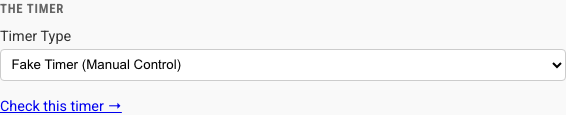 The timer section of a track's card in System Settings, with Fake Timer (Manual Control) chosen from the Timer Type dropdown.
2. Running a Race with Fake Timer
With the Fake Timer chosen, open the Race Control page for a race and switch to the Race view.
When you enter a heat, you will see the Fake Timer Controls panel docked below the current heat. If Debugging Mode is on (System Settings → Advanced), the Timer State Machine panel — a live history of the timer's own state changes — docks directly beneath those controls, since a fake timer has no wire for a serial log to tail.
Workflow
- Prepare the Heat: Ensure racers are assigned to lanes. The heat's status line shows Ready, with the timer's own state (for example, Timer: Staged) as muted text beside it, and Next Heat stays disabled until this heat has a result.
- Start the Timer: Click the Start Timer button (the one with the green arrow) on the control panel.
- The race status will change to "Racing..." and the elapsed time counter will start running.
- This stands in for the real start gate opening.
- Finish the Heat: The heat finishes on its own a few seconds after it starts. To end it sooner, click the red Finish Heat button.
- Every racer gets a made-up time between 3 and 4 seconds.
- The results will be saved and displayed immediately.
- The heat is marked as complete.
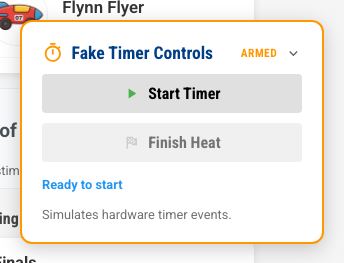 The panel docked below the current heat, on the Race tab. It collapses to its title bar when you click it, which is how the other screenshots in these guides show Race Control.
Tips
- No "Start Heat" Button: Unlike previous versions, there is no generic "Start Heat" button on the main dashboard. You must use the Fake Timer Controls to initiate the race.
- It Finishes Itself: Starting is manual, finishing is not. Three to five seconds after you press "Start Timer", the heat records its own results, the same as if you had pressed "Finish Heat". That is deliberate — it lets you click through a whole round at about the pace a real one runs.